Extract data from any financial document
Upload an invoice, receipt, or bank statement and get clean, structured data back through a single API call. Built for developers, simple enough for anyone to follow.
Documents We Read
Invoices, Receipts, and Bank Statements.
Formats Accepted
Documents - PDF, DOCX, DOC, TXT
Images - PNG, JPG, JPEG, JFIF, GIF, BMP, TIFF
Spreadsheets - XLSX, XLS, CSV
Max file size: 20MB per file
Public URLs
Process documents directly via publicly reachable or presigned URLs without uploading raw file bytes.
How It Works
Upload → get a tracking request ID → retrieve the structured result anytime.
Processing & Concurrency
Processing turnaround times can vary dynamically based on document complexity and real-time concurrent user traffic.
Model Tuning Roadmap
Active 30–45 day fine-tuning cycle on an expanded, commercially licensed financial corpus for maximum OCR and tabular accuracy.
Getting Started
Go from zero to your first extracted document in four steps.
Create an account
Sign up and log in to your dashboard.
Get your API key
Copy your key from the dashboard. Keep it secret.
Upload a document
Send a file to the processing endpoint and receive a request ID.
Retrieve the result
Use the request ID to fetch the structured data.
Base URL
https://apiocr.dexaitech.com/v1Authentication
Every request is authenticated with your API key, sent in a request header.
Add this header to every request:
X-API-Key: YOUR_API_KEY401 Unauthorized.Upload a Document
Submit a document to start AI extraction. You can upload a file directly or point us at a URL.
/v1/documents/process-asyncAuth: X-API-KeyProcessing modes
Async — wait=false
Returns 202 Accepted immediately with a request_id. Processing runs in the background; you fetch the result whenever it suits you. Best for production and large files.
POST /v1/documents/process-async?wait=falseWait — wait=true
Holds the request open and returns 200 OK with the extracted result inline once it's ready. Great for testing, demos, and small files.
POST /v1/documents/process-async?wait=trueOption A — Upload a file
Send the file as multipart/form-data.
| Field | Required | Description |
|---|---|---|
file | Yes | The document to process (PDF, JPG, JPEG, or PNG). |
wait | No | true or false. Defaults to false. |
document_type | No | Optional hint only (e.g. InvoicePDF). Never overrides automatic detection. |
clientDocumentType | No | Optional free-form document type label from your own taxonomy (e.g. "vendor-invoice"). Stored as-is and echoed back verbatim as client_document_type in every response, poll, and notification — purely informational, never used for classification. |
# Upload a file - async mode (recommended)
# clientDocumentType is optional: your own free-form label, echoed back verbatim
curl -X POST "https://apiocr.dexaitech.com/v1/documents/process-async?wait=false" \
  -H "X-API-Key: YOUR_API_KEY" \
  -F "file=@/path/to/invoice.pdf" \
  -F "clientDocumentType=vendor-invoice"
Option B — Process by URL
Public URLs refer to those which can be accessed by anyone without needing any authorisation or credentials
Send a JSON body with a link to the document. Use any of the keysurl, orpublic_url.
{
  "public_url": "https://example.com/invoice.pdf",
  "clientDocumentType": "vendor-invoice",
  "wait": false
}# Process a document by URL - no file upload needed
# clientDocumentType is optional: your own free-form label, echoed back verbatim
curl -X POST "https://apiocr.dexaitech.com/v1/documents/process-async?wait=false" \
-H "X-API-Key: YOUR_API_KEY" \
-H "Content-Type: application/json" \
-d '{"public_url": "https://example.com/invoice.pdf", "clientDocumentType": "vendor-invoice"}'What you get back (202 Accepted)
The tracking payload gives you everything needed to fetch the result later. Save the request_id.
request_id: "req_a1b2c3d4e5f6"
status: "processing"
status_url: "/v1/requests/req_a1b2c3d4e5f6"
document_url: "https://.../invoice.pdf?signature=..."
filename: "invoice.pdf"
document_type: "InvoicePDF"
client_document_type: "vendor-invoice"
confidence: 0.98
submitted_at: "2026-06-25T10:30:00Z"
poll_interval_seconds: 5
result_retained: true
message: "Document accepted and queued for processing."Check Status & Retrieve the Result
Use the request_id from step 1 to check progress and pull the final structured data.
/v1/requests/{request_id}Auth: X-API-KeyPossible statuses
Fetch the result
curl -X GET "https://apiocr.dexaitech.com/v1/requests/REQUEST_ID" \
-H "X-API-Key: YOUR_API_KEY"completed, failed, timeout, invalid, or cancelled. See the full end-to-end loop in Code Examples.wait=false) and rely on polling or webhooks.View the full processing log
Want more than just the current status? This endpoint returns the full pipeline-stage timeline for a request (received, classify, extraction, validation, scoring, completed/failed) — handy for a "processing history" view or for debugging why a document ended up in a given state.
/v1/requests/{request_id}/logsAuth: X-API-Keyrequest_id: "req_a1b2c3d4e5f6"
status: "completed"
logs[3]:
- stage: "received"
level: "INFO"
message: "Job received for file 'invoice.pdf'"
details: null
created_at: "2026-06-25T10:30:00Z"
- stage: "invoice_extraction"
level: "INFO"
message: "Extraction complete: confidence=0.98, line_items=2"
details:
confidence: 0.98
line_items: 2
created_at: "2026-06-25T10:30:07Z"
- stage: "completed"
level: "INFO"
message: "Document processing finished with status completed (8120ms)"
details: null
created_at: "2026-06-25T10:30:08Z"details is a free-form object with stage-specific data (e.g. confidence, line item count) and is null for stages that have nothing extra to attach.
Prefer a single feed instead of one call per document? Fetch the same timeline paginated across every request you've submitted, newest first — each entry additionally carries its own request_id.
/v1/logs/processingAuth: X-API-Key| Query param | Default | Description |
|---|---|---|
| page | 1 | Page number |
| page_size | 20 | Items per page (max 100) |
total: 42
page: 1
page_size: 20
logs[2]{stage,level,message,details,created_at,request_id}:
  completed,INFO,Document processing finished with status completed (8120ms),null,"2026-06-25T10:30:08Z",req_a1b2c3d4e5f6
received,INFO,Job received for file 'invoice.pdf',null,"2026-06-25T10:30:00Z",req_a1b2c3d4e5f6Document Notifications
Get notified automatically when a document is processed or updated by our review team — no polling. Choose an HTTP callback (we POST to your URL) or a WebSocket stream (you connect, nothing to host). Both deliver the same events: document.processing.completed, document.corrected, document.processing.failed.
1 — Register your callback URL (one-time)
/v1/notifications/registerAuth: X-API-Keycurl -X POST "https://apiocr.dexaitech.com/v1/notifications/register" \
-H "X-API-Key: YOUR_API_KEY" \
-H "Content-Type: application/json" \
-d '{"url": "https://your-system.example.com/notifications/financeai"}'The response includes a secret (shown only once) — store it to verify the X-Signature HMAC on every delivery. Manage it later with GET /v1/notifications and DELETE /v1/notifications.
2 — What you receive
An HTTP POST with headers X-Event, X-Timestamp, X-Signature, X-Delivery-Id and this JSON body:
{
  "event": "document.corrected",
  "documentId": "req_a1b2c3d4e5f6",
  "documentType": "invoice",
  "clientDocumentType": "vendor-invoice",
  "status": "corrected",
  "version": 2,
  "timestamp": "2026-06-27T10:30:00Z"
}
documentId is the request_id from your submit call. documentType is the classified document type (invoice, receipt, bank-statement) — null if it couldn't be resolved. clientDocumentType is your own free-form label, echoed back verbatim if you supplied one on submission — null otherwise. All three fields are present on all three event types.
Verify the signature
Compute HMAC-SHA256 over the raw request body with your stored secret and compare it to the X-Signature header.
import hmac, hashlib

def verify(secret: str, raw_body: bytes, signature: str) -> bool:
    expected = hmac.new(secret.encode(), raw_body, hashlib.sha256).hexdigest()
    return hmac.compare_digest(expected, signature)
Alternative — WebSocket stream
Prefer not to host a URL? Open a live socket and receive the same events. The connection itself is the subscription — no signature to verify.
const ws = new WebSocket(
  "wss://apiocr.dexaitech.com/v1/ws/events?x-api-key=YOUR_API_KEY"
);
ws.onmessage = (e) => {
  const msg = JSON.parse(e.data);
  if (!msg.event) return; // ignore control frames
  console.log(msg); // { event, documentId, documentType, clientDocumentType, status, version, timestamp }
};
setInterval(() => ws.send(JSON.stringify({ action: "ping" })), 25000);Response Reference
Examples for every response you might see. Responses are returned as text (TOON-encoded); the snippets below show the decoded fields.
Successful upload — 202 Accepted
request_id: "req_a1b2c3d4e5f6"
status: "processing"
status_url: "/v1/requests/req_a1b2c3d4e5f6"
document_url: "https://.../invoice.pdf?signature=..."
filename: "invoice.pdf"
document_type: "InvoicePDF"
client_document_type: "vendor-invoice"
confidence: 0.98
submitted_at: "2026-06-25T10:30:00Z"
poll_interval_seconds: 5
result_retained: true
message: "Document accepted and queued for processing."
Queued / still processing
request_id: "req_a1b2c3d4e5f6"
status: "queued"
filename: "invoice.pdf"
document_type: "InvoicePDF"
client_document_type: "vendor-invoice"
submitted_at: "2026-06-25T10:30:00Z"
completed_at: null
processing_time_ms: null
formatted_result: null
document_url: "https://.../invoice.pdf?signature=..."
Completed — with extracted data
request_id: "req_a1b2c3d4e5f6"
status: "completed"
filename: "invoice.pdf"
document_type: "InvoicePDF"
client_document_type: "vendor-invoice"
submitted_at: "2026-06-25T10:30:00Z"
completed_at: "2026-06-25T10:30:08Z"
processing_time_ms: 8120
validation: true
formatted_result:
  document_type: "InvoicePDF"
  invoice_number: "INV-2026-0042"
  invoice_date: "2026-06-20"
  supplier_name: "Acme Supplies Ltd"
  total_amount: 1240.50
  currency: "GBP"
  line_items[2]{description,quantity,unit_price,amount}:
    Consulting services,10,100.00,1000.00
    Support retainer,1,200.00,200.00
document_url: "https://.../invoice.pdf?signature=..."
Failed
request_id: "req_a1b2c3d4e5f6"
status: "failed"
filename: "invoice.pdf"
document_type: "InvoicePDF"
client_document_type: "vendor-invoice"
submitted_at: "2026-06-25T10:30:00Z"
completed_at: "2026-06-25T10:30:05Z"
error_message: "Qwen VLM service failed: timed out after 1200s"
formatted_result: null
document_url: "https://.../invoice.pdf?signature=..."
Timeout
request_id: "req_a1b2c3d4e5f6"
status: "timeout"
filename: "bank_statement.pdf"
document_type: "BankStatementPDF"
client_document_type: null
submitted_at: "2026-06-25T10:30:00Z"
completed_at: "2026-06-25T12:05:00Z"
error_message: "Processing exceeded the 95-minute limit"
formatted_result: null
document_url: "https://.../bank_statement.pdf?signature=..."
Invalid document
request_id: "req_a1b2c3d4e5f6"
status: "invalid"
filename: "receipt.pdf"
document_type: "ReceiptPDF"
client_document_type: null
submitted_at: "2026-06-25T10:30:00Z"
completed_at: "2026-06-25T10:30:03Z"
error_message: "The PDF could not be read - it appears to be corrupt, truncated, or password-protected (no pages could be extracted)."
formatted_result: null
document_url: "https://.../receipt.pdf?signature=..."
Unsupported document — 422
request_id: "req_a1b2c3d4e5f6"
filename: "holiday_photo.png"
status: "not_processed"
document_type: "other"
client_document_type: null
confidence: 0.12
message: "Document was not processed because it could not be identified as an invoice, receipt, or bank statement."Error Handling
HTTP status codes you may encounter and what each one means.
Processing failure reasons
Once a request reaches status failed, timeout, or invalid, the error_message field explains exactly what went wrong. Below are the reasons you may see, grouped by the status they cause.
LightOn OCR service failed: connection refusedQwen VLM service failed: timed out after 1200sService temporarily unavailable, please try againAn internal error occurred while processing the documentProcessing exceeded the 95-minute limitThe PDF could not be read - it appears to be corrupt, truncated, or password-protectedBest Practices
Follow these to build a reliable, efficient integration.
Use wait=false in production
Async mode keeps your app responsive and handles large or slow documents gracefully.
Poll every 5 seconds
Respect the poll_interval_seconds / Retry-After hint instead of hammering the endpoint.
Account for load fluctuations
Turnaround times can vary during high-concurrency peak traffic. Build client integrations using async queues and webhooks.
Always store the request_id
It's the only thing you need to retrieve a result later — persist it with your record.
Never re-upload
Results are retained. If you need the data again, fetch it by request_id.
Retrieve by request_id
Stop polling as soon as the status is completed, failed, timeout, invalid, or cancelled.
Keep your API key secret
Use it only from your backend; rotate it if you suspect it has leaked.
Code Examples
A complete, copy-paste flow: upload a document, then poll until the result is ready. Available in Python, JavaScript, C# (.NET), and cURL — all async.
import asyncio
import httpx

API_KEY = "YOUR_API_KEY"
BASE_URL = "https://apiocr.dexaitech.com"
HEADERS = {"X-API-Key": API_KEY}

async def process(path: str):
    async with httpx.AsyncClient(timeout=60) as client:
        # 1. Submit the document
        with open(path, "rb") as f:
            r = await client.post(
                f"{BASE_URL}/v1/documents/process-async",
                params={"wait": "false"}, headers=HEADERS,
                files={"file": f},
            )
        if r.status_code == 422:
            print("Unsupported document:", r.text); return

        # Parse request_id from the tracking payload (TOON / text)
        request_id = next(
            line.split(":", 1)[1].strip().strip('"')
            for line in r.text.splitlines() if line.startswith("request_id")
        )
        print("request_id:", request_id)

        # 2. Poll every 5 seconds until a terminal status is reached
        while True:
            await asyncio.sleep(5)
            s = await client.get(f"{BASE_URL}/v1/requests/{request_id}", headers=HEADERS)
            text = s.text
            status = next(
                (l.split(":", 1)[1].strip().strip('"')
                 for l in text.splitlines() if l.startswith("status")), "")
            print("status:", status)
            if status in ("completed", "failed", "timeout", "invalid", "cancelled"):
                print(text); return

asyncio.run(process("invoice.pdf"))System Workflow
Understand how documents flow through our intelligent extraction system.
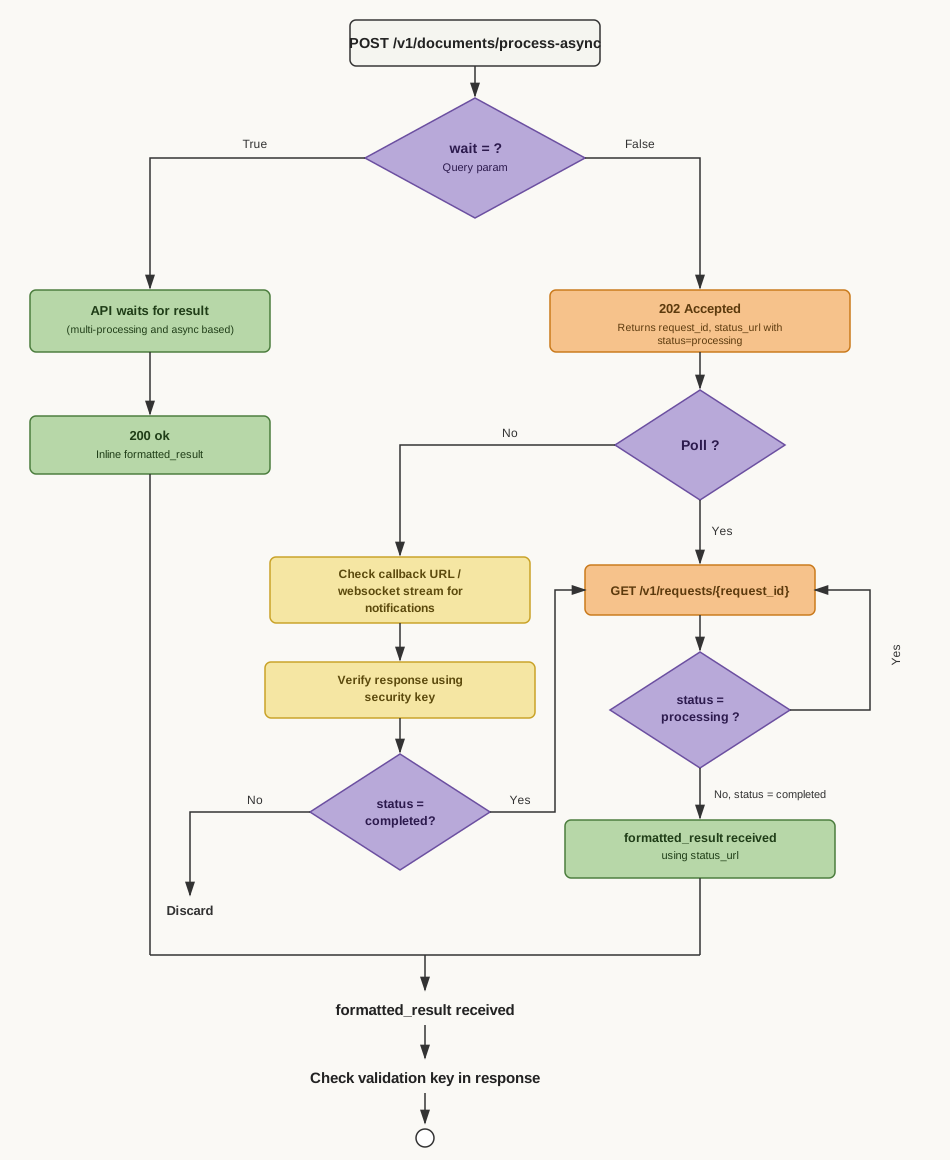
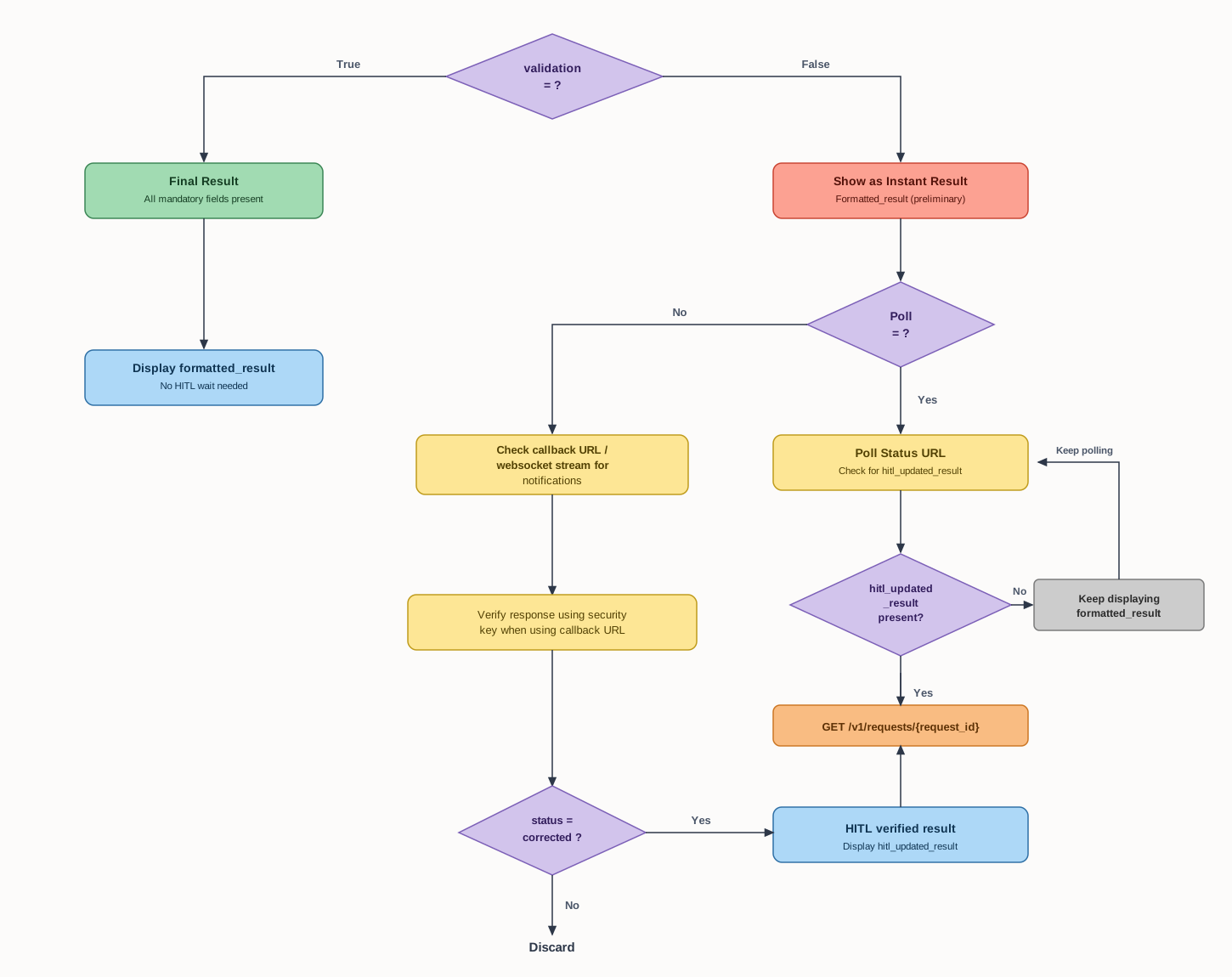
Model Tuning & Performance Optimization Roadmap
To deliver best-in-class extraction precision and speed, our engineering team is actively executing a comprehensive 30–45 day model fine-tuning and continuous training pipeline.
Targeted Accuracy & Multimodal Performance Upgrades
We are fine-tuning our vision-language backbones and OCR processing pipelines on an expanded, multi-jurisdiction financial corpus to elevate edge-case accuracy, tabular extraction fidelity, and processing throughput.
Core Optimization Pillars
Dataset Expansion
Aggregating diverse, large-scale financial corpora including complex multi-page bank statements, multi-currency invoices, thermal receipts, and diverse tabular layouts.
Licensing & Governance
Comprehensive legal vetting to guarantee commercial licensing rights, copyright compliance, automated PII anonymization, and adherence to GDPR and SOC 2 security standards.
Performance Benchmarking
Continuous evaluation against strict ground-truth benchmarks, validating line-item precision, subtotal arithmetic integrity, and zero regression across standard templates.
4-Stage Tuning & Deployment Pipeline
Dataset Sourcing & Licensing
Acquiring multi-jurisdictional financial documents with full commercial license clearance and verification.
Sanitization & Labeling
Automated PII redaction, noise filtering, image normalization, and key-value pair ground truth annotation.
Model Fine-Tuning
Hyperparameter optimization and domain-specific weight tuning of vision-language and OCR models on GPU clusters.
Validation & Release
Benchmark evaluation, stress testing, and rolling zero-downtime deployment to production endpoints.
Expected Capabilities & Performance Gains
Frequently Asked Questions
Which file formats are supported?+
Documents (PDF, DOCX, DOC, TXT), Images (PNG, JPG, JPEG, JFIF, GIF, BMP, TIFF), and Spreadsheets (XLSX, XLS, CSV). Max file size: 20MB per file.
Do I need to keep the connection open while my document is processed?+
No. With the recommended async mode (wait=false) you get a request_id immediately and fetch the result whenever you like. Even a job that takes an hour is retrieved the same way as one that takes seconds.
How long are results kept?+
Results are persisted and retained. You can retrieve them later using the request_id — there is no deadline, so there's never a need to re-upload the same document.
How often should I poll for the result?+
Every 5 seconds is the recommended cadence (the 202 response also returns this in poll_interval_seconds and the Retry-After header). Keep polling until the status is completed, failed, timeout, invalid, or cancelled.
What's the difference between wait=false and wait=true?+
wait=false (default) returns immediately with a request_id — best for production. wait=true holds the request open and returns the extracted result inline when it finishes in time — handy for quick tests and demos. If it doesn't finish in time, you get the same tracking response and fall back to polling.
Do I have to send a document_type?+
No. document_type is an optional hint only — the service always detects the document type itself, so the hint never overrides the result.
Can I process a document already hosted somewhere?+
Yes. Instead of uploading a file, send a JSON body with public_url (or url / public_url) pointing at a publicly reachable or presigned link. No file upload required.
What happens if I upload something that isn't a financial document?+
You get an immediate 422 with status not_processed. Nothing is queued or stored, so you aren't charged for processing it.
What is clientDocumentType and how is it different from document_type?+
document_type is our classifier's result (invoice, receipt, bank-statement) — you can't override it. clientDocumentType is optional and entirely yours: a free-form label from your own taxonomy (e.g. "vendor-invoice"), stored as-is and echoed back verbatim in every poll response and notification. Use it to correlate results with your own internal categories.
Why does document processing time vary, and can high user concurrency cause fluctuations?+
Document extraction involves deep vision-language and OCR model computation. Total processing time depends on document complexity (e.g. multi-page bank statements with dense tables vs. single-page receipts) and real-time API server load. During peak traffic periods when many users are concurrently submitting files, jobs are managed through our distributed queue, which may introduce temporary turnaround variations. To ensure high availability and responsiveness, always use async mode (wait=false) with polling or register webhook notifications.
What is the timeline for model fine-tuning and performance upgrades?+
We are actively executing a 30–45 day model fine-tuning cycle. This engineering initiative focuses on upgrading our vision-language and OCR models to boost extraction precision on complex multi-page bank statements, noisy scans, and international invoice formats without altering API endpoints or response schemas.
How are datasets collected and verified for model tuning?+
We expand our dataset corpora with diverse, real-world financial documents across varied currencies, tabular structures, and scan qualities. Every dataset undergoes strict commercial licensing verification, copyright clearance, automated PII anonymization, and GDPR/SOC-2 compliance screening before entering the training pipeline.
Will upcoming model tuning updates cause downtime or breaking changes?+
No. All fine-tuned models undergo automated regression testing and benchmark validation, and are deployed via rolling zero-downtime releases. All existing API endpoints, TOON/JSON response schemas, and webhook integrations remain fully backward-compatible.